
Fapcraft Wiki | Official Fapcraft Mod Guide
Fapcraft Wiki is a community-based reference guide for players who want to learn more about the Fapcraft Minecraft mod. It brings useful information about the mod into one place, including its characters, features, supported versions, gameplay elements, compatibility, and installation details.
Fast Updates
Fapcraft Guides
Fast Direct Download


Instead of searching through different pages for basic information, players can use this Wiki to understand what Fapcraft offers and how its different parts work.
Whether you are new to the mod or already familiar with it, this Wiki provides a simple reference for understanding how Fapcraft works and what it offers. It also covers compatibility, platform support, safety information, troubleshooting, and other details that can help players use the mod with fewer issues.
Minecraft Modding Background
Minecraft mods have long given players a way to change the standard game with content that is not included in the original release. Depending on the project, a mod can introduce new characters, custom models, textures, animations, items, or other gameplay elements. This has created a large community around creating, sharing, and documenting different Minecraft modifications.
Fapcraft follows this same community-made approach by adding its own custom content to the Minecraft experience. Its Wiki keeps information about these additions organized, especially when different releases have different features, installation methods, and Minecraft version requirements. Players can use it as a reference before exploring the mod or setting up a compatible version.
Technical Overview of Fapcraft
Fapcraft uses a combination of custom game assets to change the standard Minecraft experience. These can include textures, resource packs, character models, animations, addons, and configuration files, depending on the version being used. Together, these components control how the mod’s custom content looks and works inside the game.
The technical setup is not the same for every release. Java Edition versions may use .jar files with a compatible mod loader, while Bedrock and MCPE versions can rely on addon packages such as .mcpack or .mcaddon. This means the Minecraft version, file type, and required components should be checked before installation to ensure everything works together correctly.
Java Edition Installation
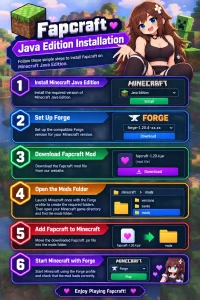
Java Edition versions of Fapcraft are installed through a compatible mod loader such as Forge. First, make sure your Minecraft version matches the Fapcraft release you want to use.
Bedrock and MCPE Installation
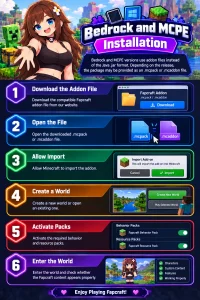
Bedrock and MCPE versions use addon files instead of the Java .jar format. Depending on the release, the package may be provided as an .mcpack or .mcaddon file.
Android Installation
The Bedrock version is also available on mobile, which means the steps for Bedrock and Android will be the same. But many users get confused and separately look for the Fapcraft Android installation method. For Android, just follow the Above Bedrock steps and enjoy playing.
Fapcraft Version History
Fapcraft has been released in different versions as the mod has developed and expanded its Minecraft support. Each release can bring changes to its content, compatibility, visuals, and overall gameplay experience.
Fapcraft Platform Support
Fapcraft support can vary depending on the Minecraft edition and the release you choose. The table below shows the common platforms and file types associated with different Fapcraft setups.
Common Fapcraft Issues and Fixes
Fapcraft may not work properly when the mod file, Minecraft version, or required setup does not match. Here are some common issues and simple checks you can try.
Fapcraft Compared With Other Minecraft Mods
Fapcraft, Jenny Mod, and vanilla Minecraft offer different types of gameplay and customization. This table highlights the main differences between them.
FAQs
Final Words
To conclude, the Fapcraft Wiki brings key details about the Fapcraft Minecraft mod into one simple guide. From its background and technical overview to version history,